
Humly Control Panel can anonymize old bookings every night, or once for a date range you choose. Both use the fields selected in the retention policy. See Data retention and anonymization for what is replaced.
Version 2.6 and later
Only Global Admins can anonymize data.
In this article
- Turn on automatic anonymization
- How the automatic run works
- Anonymize a date range now
- When a run fails
Turn on automatic anonymization
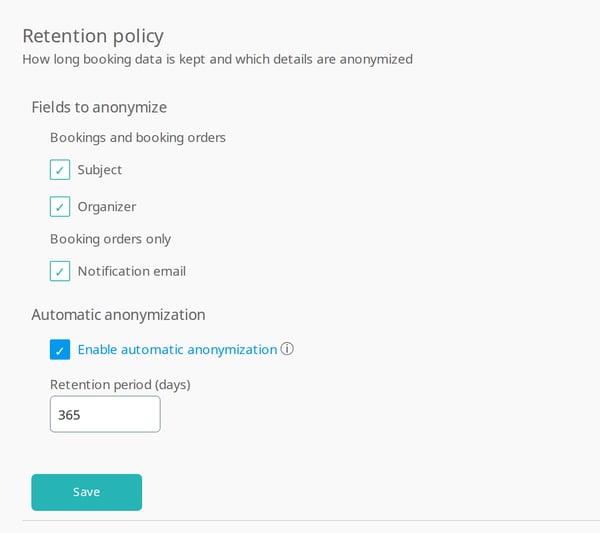
- Go to Settings > Data retention.
- Under Fields to anonymize, select the fields. At least one is needed.
- Select Enable automatic anonymization.
- Enter the Retention period (days), from 60 to 3650. The default is 365.
- Select Save.
How the automatic run works
- It runs every night at 04:00, in the time zone of the server that runs Humly Control Panel.
- It anonymizes the bookings that ended more than the retention period ago, and their booking orders.
- Each run continues where the last one stopped, so a normal night is quick.
- The first run after you turn it on covers all older bookings. On a large installation it can take a while.
- When you change and save the retention policy, a run in progress stops. The next night's run uses the new settings and checks all archived bookings again.
Anonymize a date range now
Use this for a one-off clean-up, for example before you turn on automatic anonymization.
- Check that the fields you want are selected and saved under Retention policy. Anonymize now uses the saved fields.
- Under Anonymize now, choose From and To. The dates are in UTC. The last 60 days cannot be chosen.

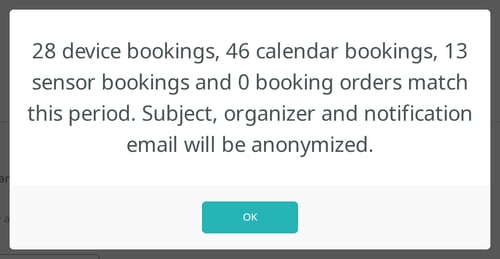
- Select Preview to see how many bookings and booking orders match. Nothing is changed.
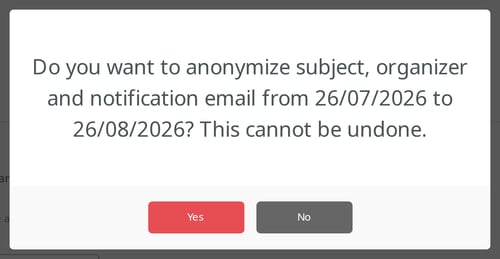
- Select Anonymize, then Yes to confirm.
When the run is done, a message shows how many bookings and booking orders were anonymized. You can leave the page while it runs. The run continues on the server.
When a run fails
If the last automatic run failed, the tab shows a message until a run succeeds.

- The reason is in the server log. On Humly Cloud, contact Humly support.
- A run also fails if another anonymization is running at 04:00. Avoid starting Anonymize now close to that time.
- Bookings anonymized before the failure stay anonymized. The next night's run continues.
Data privacy guide
Get started
How to
- Anonymize old booking data
- Anonymize one person's booking data