
When a person asks to have their data removed, anonymize their past bookings by email address. You can keep their user account, or delete the account at the same time.
Version 2.6 and later
Only Global Admins can anonymize data.
In this article
What is anonymized
- The archived bookings the person organized. The subject and organizer are always replaced, whatever fields the retention policy selects.
- The booking orders of the person's bookings that have ended.
- The person's address where it is the notification email of a booking order.
The 60-day limit does not apply, so recent archived bookings are included. See Data retention and anonymization for the replacement text.
Anonymize and keep the account
- Go to Settings > Data retention.
- Under Anonymize one person's data, enter the person's email address.

- Select Anonymize, then Yes to confirm.
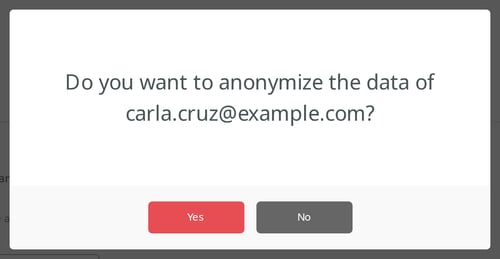
A message shows how many archived bookings and booking orders were anonymized. Upper and lower case in the address do not matter.
Anonymize when you delete a user
- Go to Users and select the user.
- Select Manage Selected > Delete.
- Select Also anonymize this user's historical booking data, then Delete.
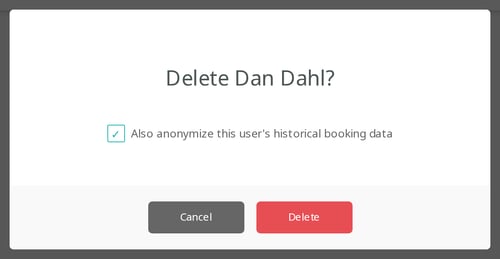
The data is anonymized first, using the user's email address. If that fails, the account is not deleted.
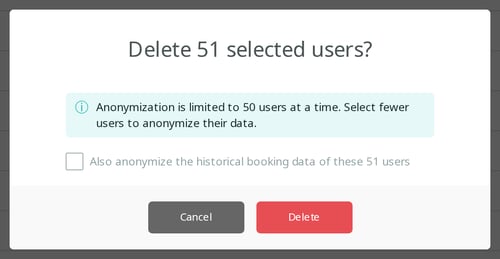
You can delete up to 50 users at a time with this option. With more selected, the option is turned off.
Good to know
- The request covers what is archived when you run it. A booking that ends today is archived after midnight with the person's details. Run the request again the next day if needed.
- If the address is the notification email for catering or custom requests, the request stops. Change the notification email in the settings, then try again.
- Bookings in your calendar system are not changed. Remove them there as well.
- Deleting a user removes the scheduled statistics exports they own. See Scheduled statistics exports.
Data privacy guide
Get started
How to
- Anonymize old booking data
- Anonymize one person's booking data