
Humly Control Panel keeps past bookings for statistics. Anonymization replaces the personal details in them with neutral text. The resource, the times and the check-in data stay, so statistics and exports show the same numbers.
Version 2.6 and later
Data retention is available from version 2.6. Only Global Admins can see the Data retention tab.
In this article
- What Humly Control Panel keeps
- The Data retention tab
- What anonymization replaces
- Three ways to anonymize
- What is not anonymized
- Good to know
What Humly Control Panel keeps
Shortly after midnight in the resource's time zone, bookings that ended the day before become archived bookings. An archived booking keeps:
- the resource, the times and the check-in data
- the subject and the organizer
- the number of attendees, but not their names
- how the booking was made, for example on a device or in Humly Reservations
Catering and custom request orders are called booking orders. They keep a copy of the subject and organizer, and the notification email address.
When you upgrade to 2.6, Humly Control Panel removes attendee names and the names in the change history from older archived bookings. The number of attendees stays. This happens once, at the first start after the upgrade.
The Data retention tab
Go to Settings > Data retention.
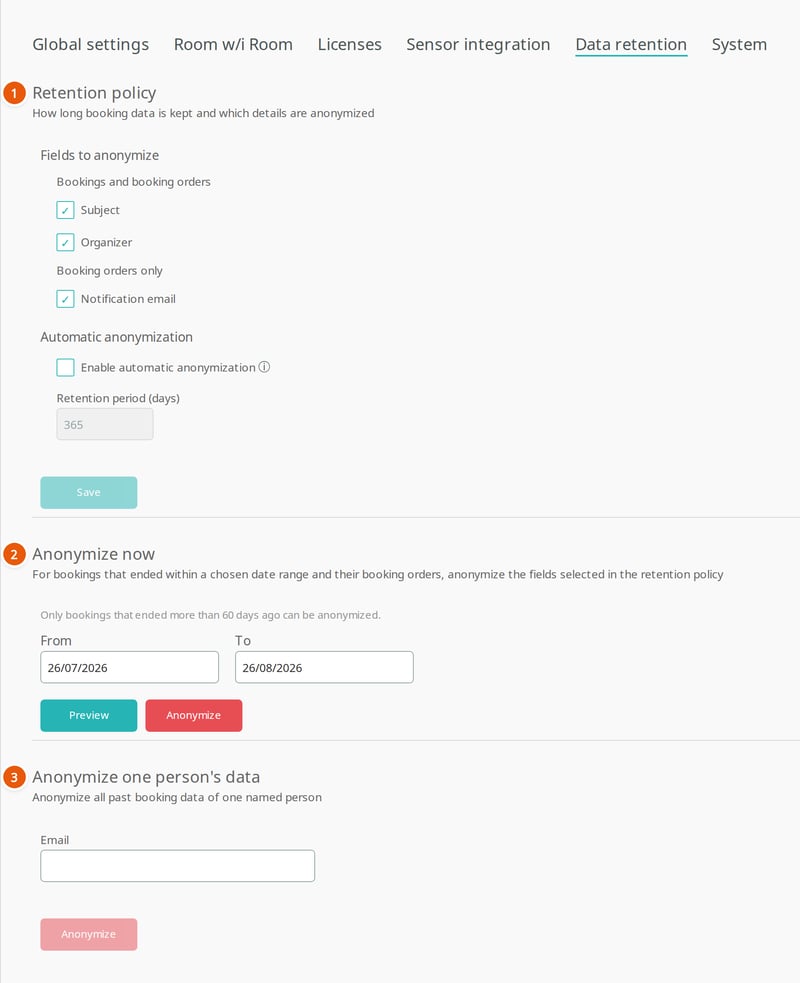
- Retention policy: which fields are anonymized, and automatic anonymization after a number of days.
- Anonymize now: anonymize the bookings that ended in a date range.
- Anonymize one person's data: anonymize the bookings of one person, by email address.
What anonymization replaces
Under Fields to anonymize you choose the fields. All three are selected by default.
| Field | Applies to | Replaced with |
|---|---|---|
| Subject | Archived bookings and booking orders | Device and sensor bookings: Booked or Booked on screen. Other bookings: Booked in calendar. Booking orders: Booked. |
| Organizer | Archived bookings and booking orders | Device bookings: Booked on screen. Sensor bookings: Humly Sense. Other bookings: Booked in calendar, with no email address. Booking orders: Anonymized, with no email address. |
| Notification email | Booking orders only | Removed. |
Anonymization cannot be undone.
Three ways to anonymize
| Way | What it covers | Read more |
|---|---|---|
| Automatic anonymization | Every night, the bookings that ended more than the retention period ago. | Anonymize old booking data |
| Anonymize now | The bookings that ended in a date range you choose, more than 60 days ago. | Anonymize old booking data |
| One person's data | All past bookings one person organized, at any age. | Anonymize one person's booking data |
The booking orders of the covered bookings are anonymized too.
What is not anonymized
- Bookings that are not archived yet: ongoing and upcoming bookings, and bookings that ended today.
- Recurring meetings: the subject, organizer and attendees kept for a running series.
- Order details: the description and reference written on a booking order.
- Other data: visitor registrations, visitor events and visitor logs, the copy of the last user CSV import, server and device logs, and the record of which admin changed a setting.
- Backups made before an anonymization. Restoring one brings the original data back.
- Systems outside Humly: your calendar system, emails already sent and files already exported.
Good to know
- Statistics keep the same numbers after anonymization. Usage per person is no longer possible for anonymized bookings.
- Only one anonymization runs at a time. While one runs, the tab shows a message.

- If an anonymization stops partway, what it already did stays anonymized. Run it again to finish.
- A field you select later is also anonymized in bookings an earlier run covered. Clearing a field does not bring data back.
- After you restore a backup, the next automatic run checks all archived bookings again.
Related: Raw data export columns shows how anonymized bookings look in an export.
Data privacy guide
Get started
- Data retention and anonymization
How to