
Humly Sensor Gateway (HSG) brings LoRaWAN and MQTT sensor data into Humly Control Panel. It runs on a server in your own network. Sensor data goes from your sensors to HSG, and from HSG to Humly Control Panel. No sensor vendor cloud is involved.
In this article
- What is Humly Sensor Gateway?
- How it works
- Where HSG fits among Humly's sensor options
- Supported protocols
- Tested sensors
- Sensor data in Humly
- Security at a glance
- What you need
- Next steps
What is Humly Sensor Gateway?
HSG is a small service you install on a Windows or Linux server. It receives readings from your sensors and forwards them to Humly Control Panel. Humly Control Panel then shows them on room displays, booking devices and the floor plan.
HSG does four things:
- Receives LoRaWAN readings from your network server through a webhook.
- Runs its own MQTT broker, with a separate login for each sensor.
- Lets an administrator approve, name and monitor sensors in a web dashboard.
- Sends readings from approved sensors to Humly Control Panel over HTTPS.
How it works
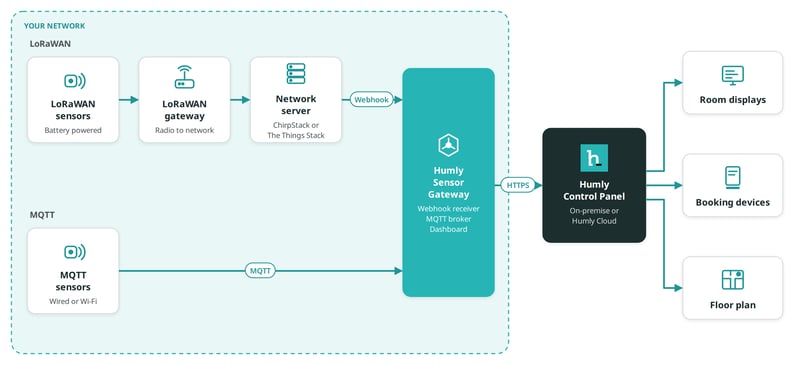
- LoRaWAN sensors send radio messages to a LoRaWAN gateway. The gateway passes them to your network server, ChirpStack or The Things Stack.
- The network server decodes each message. It sends the result to HSG through a webhook.
- MQTT sensors publish their readings straight to the MQTT broker inside HSG.
- A new sensor waits in HSG as pending. An administrator names it and approves it.
- HSG sends readings from approved sensors to Humly Control Panel over HTTPS.
- Humly Control Panel shows the readings on room displays, booking devices and the floor plan.
Where HSG fits among Humly's sensor options
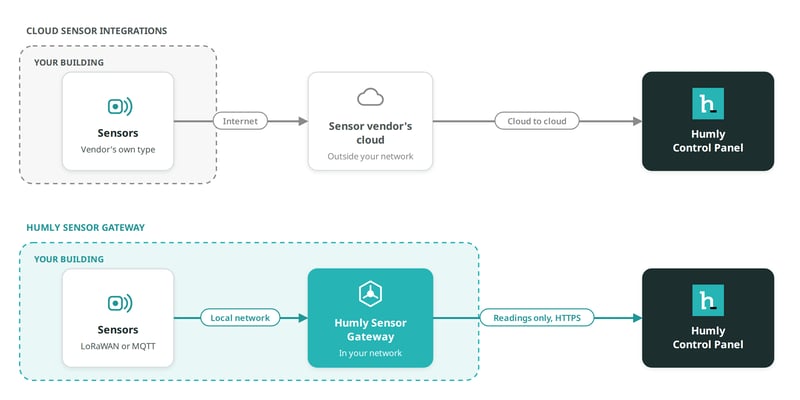
Humly Control Panel already connects to several sensor platforms through their cloud services. HSG adds a second path that stays inside your network.
| Choose | When |
|---|---|
| A cloud sensor integration | Sensor data may pass through the sensor vendor's cloud. You want a managed sensor service from that vendor. |
| Humly Sensor Gateway | Sensor data must stay in your network. You already own LoRaWAN or MQTT sensors. Your sensors run on a network without internet access. |
See Humly Sensor Gateway - Use cases for examples.
Supported protocols
| Protocol | How it connects | Supported |
|---|---|---|
| LoRaWAN | Your network server sends readings to HSG through a webhook. The network server must decode the sensor data. | ChirpStack v3 and v4. The Things Stack, including The Things Network and The Things Industries. |
| MQTT | Sensors publish to the MQTT broker built into HSG. Each sensor gets its own username and password. | Atlona AT-OCS-900N. Other MQTT sensors on request. |
Tested sensors
These sensors are tested end to end with HSG and Humly Control Panel.
| Brand | Sensor | Protocol | Readings |
|---|---|---|---|
| Atlona | AT-OCS-900N | MQTT | Motion, temperature |
| Browan | Tabs TBMS100 | LoRaWAN | Occupancy, temperature |
| Dragino | AQS01 | LoRaWAN | CO2, temperature, humidity |
| enerthing | enerSENSE CO2 | LoRaWAN | CO2, temperature, humidity, motion |
| MClimate | CO2 Sensor | LoRaWAN | CO2, temperature, humidity |
| Milesight | VS121 | LoRaWAN | People count |
| Milesight | WS202 | LoRaWAN | Motion |
Tested LoRaWAN gateway: Milesight UG63. Tested network servers: ChirpStack v4 and The Things Stack.
Have a sensor that is not on the list?
Tell us about it. Email support@humly.com with the brand, the model and whether it uses LoRaWAN or MQTT. Most LoRaWAN sensors work without changes. For other MQTT sensors, we can add support in an HSG update.
Sensor data in Humly
| Reading | Where you see it |
|---|---|
| Motion, occupancy, presence | Presence-based booking and check-in. Phone booth status on the floor plan. Booking devices show phone booth status from motion sensors. |
| Temperature, humidity, CO2 | Room displays, with a warning when a value is outside the range you set. Resource details in Humly Control Panel. |
| People count | The floor plan, and resource details in Humly Control Panel. |
Security at a glance
- HSG only makes outbound connections to Humly Control Panel. Humly Control Panel never connects in to HSG.
- You do not need to expose your network server or MQTT broker to the internet. With an on-site network server, such as ChirpStack, nothing connects in from the internet.
- A cloud network server, such as The Things Stack, sends its webhook from the internet. HSG's webhook address must then be reachable from outside your network.
- Each MQTT sensor has its own login. A leaked password exposes one sensor, not the broker.
- LoRaWAN webhooks use access tokens that you create in HSG.
- The HSG dashboard supports two-factor authentication. It can run over HTTPS with your own certificate.
What you need
- Humly Control Panel 2.5 or later.
- A Humly Sensor Gateway licence. One licence covers any number of sensors.
- The Humly Sensor Gateway integration turned on in Humly Control Panel.
- A Windows or Linux server in your network.
- A LoRaWAN network server, or sensors that publish over MQTT.
Full details are in Humly Sensor Gateway - Requirements.
Next steps
- Humly Sensor Gateway - Use cases
- Humly Sensor Gateway - Requirements
- Install Humly Sensor Gateway on Windows
- Install Humly Sensor Gateway on Linux
- Humly Sensor Gateway - First-time setup
Humly Sensor Gateway guide
Get started
- Humly Sensor Gateway - Overview
- Humly Sensor Gateway - Use cases
- Humly Sensor Gateway - Requirements
Install and set up
- Install Humly Sensor Gateway on Windows
- Install Humly Sensor Gateway on Linux
- Humly Sensor Gateway - First-time setup
Connect sensors
- Connect LoRaWAN sensors to Humly Sensor Gateway
- Connect ChirpStack to Humly Sensor Gateway
- Connect The Things Stack to Humly Sensor Gateway
- Connect MQTT sensors to Humly Sensor Gateway
Manage and troubleshoot