
Humly Sensor Gateway (HSG) brings LoRaWAN and MQTT sensors into Humly without a sensor vendor cloud. This article shows the situations where it fits best.
In this article
- Keep sensor data on site
- Reuse your LoRaWAN network
- Use the sensors already in your rooms
- Sensors on an isolated network
- Choose sensors freely
- Cover large buildings without cabling
Keep sensor data on site
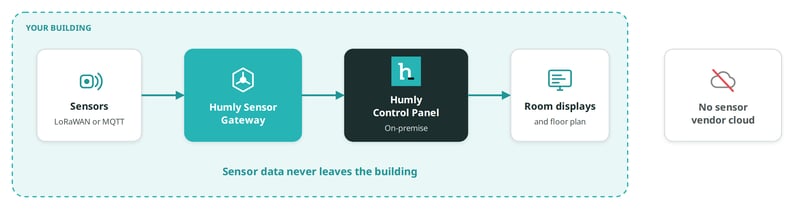
The situation: Your policy does not allow sensor data in a third-party cloud. This is common in the public sector, healthcare, finance and defence.
How HSG helps: Sensors send data only to HSG in your network. With on-premise Humly Control Panel, the data never leaves your building. With Humly Cloud, HSG sends only the readings to Humly Control Panel. No sensor vendor cloud is involved in either case.
Good to know
To keep LoRaWAN data fully on site, run your own network server, such as ChirpStack. The Things Network and The Things Industries are cloud services.
Reuse your LoRaWAN network
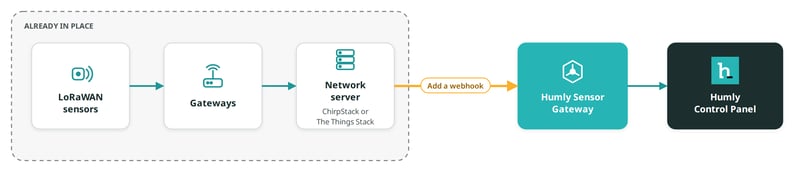
The situation: You already run LoRaWAN for facilities, energy or building management.
How HSG helps: Keep your gateways, sensors and network server. Add one webhook from the network server to HSG. Readings from the sensors you approve then appear in Humly.
Good to know
HSG uses the data your network server has already decoded. Most LoRaWAN sensors with a standard decoder work without changes.
Use the sensors already in your rooms
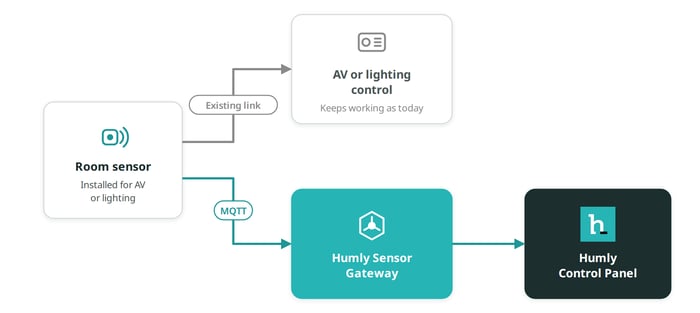
The situation: Your meeting rooms already have occupancy sensors for AV or lighting control.
How HSG helps: Many of these sensors can also publish over MQTT. Point the sensor's MQTT settings at HSG. AV or lighting control keeps working as before, and Humly gets the same readings.
Good to know
The Atlona AT-OCS-900N is supported today. For other MQTT sensors, email support@humly.com.
Sensors on an isolated network
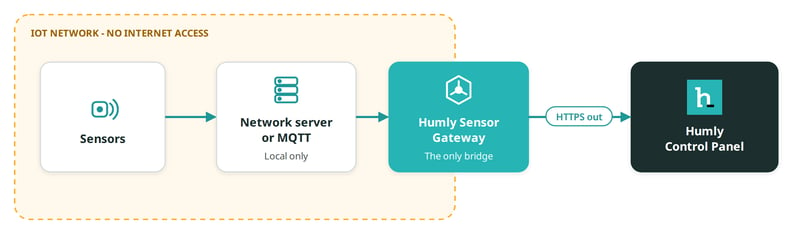
The situation: Your security policy puts IoT devices on a separate network without internet access.
How HSG helps: Sensors talk only to a local network server, or to the MQTT broker in HSG. HSG is the only device that connects out. It connects only to Humly Control Panel, over HTTPS.
Good to know
With an on-site network server, no connections come in from the internet. Your firewall stays closed.
Choose sensors freely
The situation: You want different sensor types from different brands. You may change brands later.
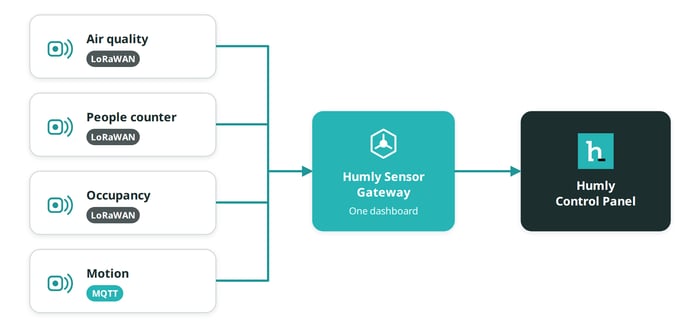
How HSG helps: HSG handles LoRaWAN and MQTT sensors side by side. You manage all of them in one dashboard. Adding another LoRaWAN brand usually needs no change in Humly.
Cover large buildings without cabling
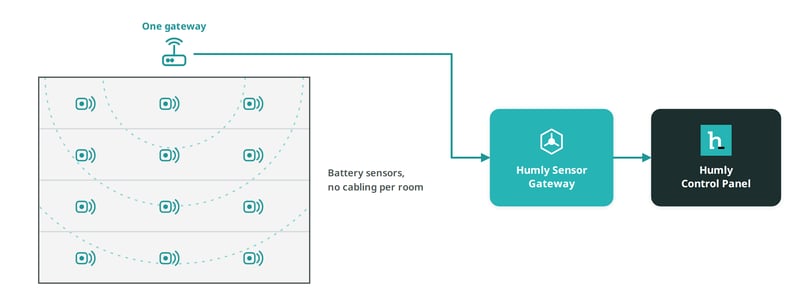
The situation: You want room data across many floors. Cabling every room costs too much.
How HSG helps: LoRaWAN sensors run on batteries and use long-range radio. One gateway can often cover several floors. HSG collects the readings from every gateway through your network server.
Good to know
Battery life is often several years. It depends on the sensor and how often it reports.
Next steps
Humly Sensor Gateway guide
Get started
- Humly Sensor Gateway - Overview
- Humly Sensor Gateway - Use cases
- Humly Sensor Gateway - Requirements
Install and set up
- Install Humly Sensor Gateway on Windows
- Install Humly Sensor Gateway on Linux
- Humly Sensor Gateway - First-time setup
Connect sensors
- Connect LoRaWAN sensors to Humly Sensor Gateway
- Connect ChirpStack to Humly Sensor Gateway
- Connect The Things Stack to Humly Sensor Gateway
- Connect MQTT sensors to Humly Sensor Gateway
Manage and troubleshoot